> For the complete documentation index, see [llms.txt](https://docs.zmanda.com/llms.txt). Markdown versions of documentation pages are available by appending `.md` to page URLs; this page is available as [Markdown](https://docs.zmanda.com/zmanda-classic/installation-and-configuration/step-3-add-sources.md).

# Step 3: Add Sources

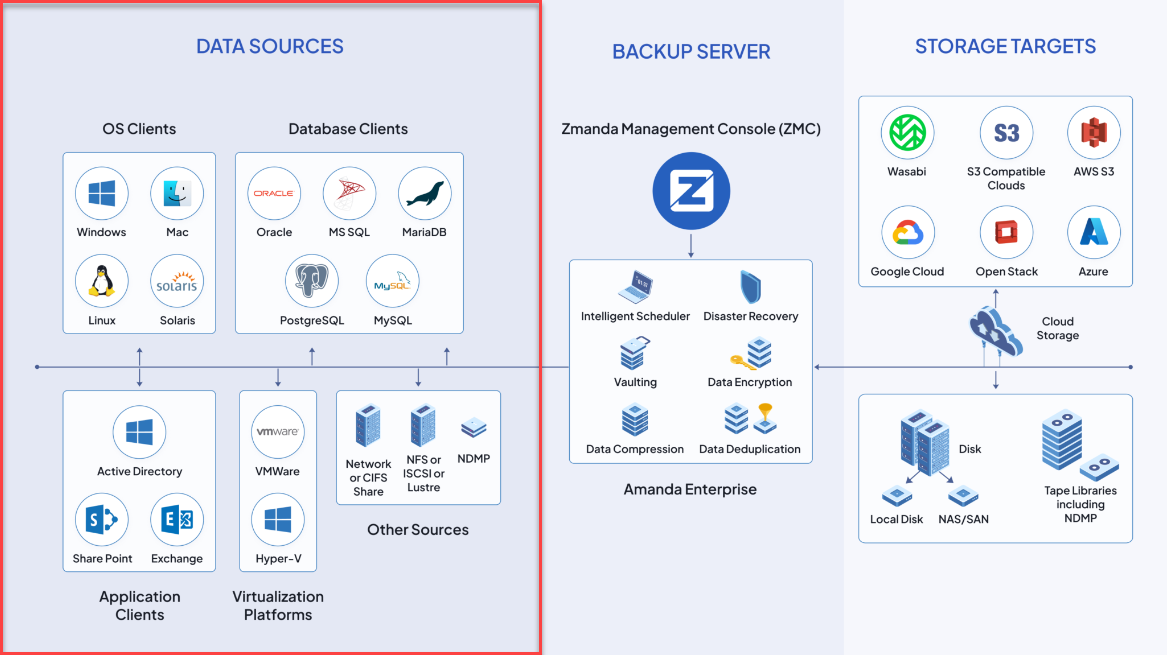
Data, data, data. You have a lot of data in a lot of different places. Whether your data is stored on a bare-metal Linux or Windows server, a VM, database, or file share, Zmanda has you covered. Follow along for how to add your data sources within the ZMC console, and link them to a Backup Set.

<figure><img src="/files/fyuVaRmHyLFJN6Hs0nhh" alt=""><figcaption></figcaption></figure>

See the below table for the sources supported by Zmanda. Please go see our full [compatibility matrix](https://www.zmanda.com/compatibility-matrix/) for a complete list along with version information. If you don't see a source or version that you are looking for, please contact <sales@zmanda.com>, and we will let you know if we have plans to support your desired workload.

| **Linux**                                                                         |                                                                                              |
| --------------------------------------------------------------------------------- | -------------------------------------------------------------------------------------------- |
| <p>CentOS<br>Debian<br>Fedora<br>Oracle Enterprise Linux</p>                      | <p>Red Hat Enterprise Linux (server & desktop)</p><p>Rocky Linux<br>Suse Linux<br>Ubuntu</p> |
|                                                                                   |                                                                                              |
| **Microsoft Windows**                                                             |                                                                                              |
| Microsoft Windows Server                                                          | Microsoft Windows Desktop                                                                    |
|                                                                                   |                                                                                              |
| **Virtualization Platforms**                                                      |                                                                                              |
| Hyper-V Cluster & Hyper-V Windows Server                                          | VMware vSphere                                                                               |
|                                                                                   |                                                                                              |
| **Applications**                                                                  |                                                                                              |
| Microsoft Exchange Server                                                         | Microsoft SharePoint Server                                                                  |
|                                                                                   |                                                                                              |
| **Databases**                                                                     |                                                                                              |
| <p>Microsoft SQL Server<br>Oracle Server on Linux<br>Oracle Server on Solaris</p> | <p>Oracle Server on Windows<br>PostgreSQL</p>                                                |
|                                                                                   |                                                                                              |
| **File shares**                                                                   |                                                                                              |
| NFS, iSCSI, SMB/CIFS, NDPM, Lustre                                                |                                                                                              |

---

# Agent Instructions
This documentation is published with GitBook. GitBook is the documentation platform designed so that both humans and AI agents can read, navigate, and reason over technical content effectively. Learn more at gitbook.com.

## Querying This Documentation
If you need additional information that is not directly available in this page, you can query the documentation dynamically by asking a question.

Perform an HTTP GET request on the current page URL with the `ask` query parameter:

```
GET https://docs.zmanda.com/zmanda-classic/installation-and-configuration/step-3-add-sources.md?ask=<question>
```

The question should be specific, self-contained, and written in natural language.
The response will contain a direct answer to the question and relevant excerpts and sources from the documentation.

Use this mechanism when the answer is not explicitly present in the current page, you need clarification or additional context, or you want to retrieve related documentation sections.
